
How to Change the Client Area Password

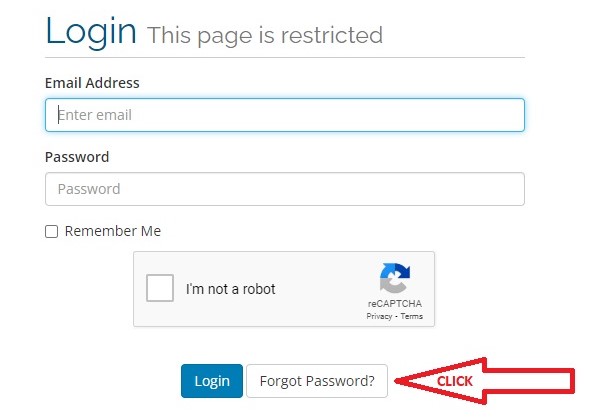
Please visit this link https://clientarea.nexus.pk/index.php?rp=/password/reset , and click on forgot password.

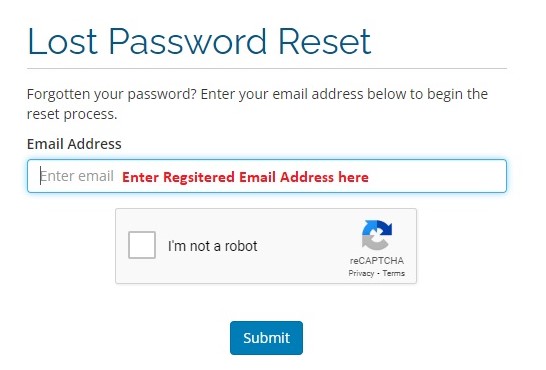
1. Add your registered / authorized / primary email ID and click on submit button
2. Password reset link email will be sent on registered email ID
3. System will ask for security question (if have set), enter answer and click on submit button
4. Page will be appeared for new password set
5. Enter new password, re-enter for confirmation and save changes
6. After password reset confirmation on email, client-area can be login with registered
email ID and new password


  • Clientarea, password, resetpassword
  • 10 Users Found This Useful
Was this answer helpful?

Related Articles

How to Unlock your Domain & Retrieve EPP Code from Client Area

How to unlock your domain & Retrieve EPP Code from Client Area Login to your Nexus client...

Change Hosting account password

You can reset your password for your hosting account via our client area. This feature is...

How to Login to your Client area

You can Login to Nexus ClientArea  Visit Clientarea Login Page Enter your registered /...

How to check Email History

You can check your recent and previous emails send by Nexus Technologies Login to...

How I can check my Invoices from Client Area

You can check your all paid/unpaid invoices from Client Area: Login to...